
NEW DELHI, India | September 7, 2026 —
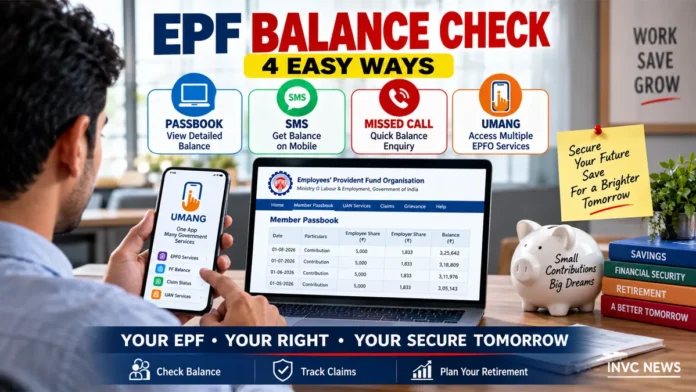
EPF Balance Check has become easier for Employees’ Provident Fund Organisation members because workers can now view their PF passbook online, use the UMANG app, send an SMS or use EPFO’s missed-call service.
Employees should also keep their Universal Account Number, or UAN, active and ensure that important details such as Aadhaar, mobile number and bank account information remain correctly linked.
A properly maintained UAN gives members access to services including passbook viewing, PF transfers, withdrawals, advances, pension-related claims and claim-status tracking.
Here is a complete guide to checking EPF balance and managing the account.
EPF Balance Check Through Member Passbook
The online passbook remains one of the most detailed ways to check an EPF account.
Members can open EPFO’s official Member Passbook service and sign in using their UAN and password.
After login, the passbook can show contribution information associated with eligible member accounts.
Workers can review employee contributions, employer contributions and transaction entries recorded in the account.
The passbook provides more useful information than a simple balance SMS because members can examine the history of contributions.
Employees should periodically compare the passbook with their salary slips.
If the employer has deducted PF from salary but the corresponding contribution does not appear after a reasonable processing period, the employee should first seek clarification from the employer and then use EPFO’s grievance mechanism where necessary.
Check EPF Balance by Missed Call
EPFO also offers a balance-enquiry facility that works without a smartphone.
A registered member can give a missed call to:
9966044425
The call should come from the mobile number registered with the UAN.
EPFO’s current instructions say the mobile number must be activated with the UAN, and at least one qualifying KYC detail such as Aadhaar, PAN or bank-account information should be available against the UAN for the missed-call facility.
The call disconnects automatically, and EPFO sends available account information to the registered mobile number.
This method can help users who do not want to log in to the portal every time they want a quick balance update.
Check PF Balance by SMS
Members with an activated UAN can also check their latest PF contribution and balance through SMS.
Send:
EPFOHO UAN
to:
7738299899
The SMS must come from the mobile number registered with the UAN.
EPFO supports the service in multiple Indian languages.
Users can add the prescribed three-letter language code after UAN when they want the response in a supported language other than English.
The SMS facility can provide the latest contribution and available PF balance information along with selected KYC details.
Check EPF Through UMANG
UMANG provides another route to EPFO services on mobile devices.
Members can use EPFO services available inside the government’s UMANG app for functions including account-related access and claims.
The app has become particularly important because EPFO has expanded UAN-related services through Aadhaar-based Face Authentication Technology.
Users should install only the genuine UMANG application and avoid third-party apps that request EPFO passwords, Aadhaar OTPs or payments.
How to Activate UAN in 2026
EPFO has moved UAN activation toward Aadhaar-based digital verification through UMANG.
The current process uses Face Authentication Technology.
Members generally need:
- A valid Aadhaar number
- Access to the mobile number linked with Aadhaar
- The UMANG app
- The Aadhaar Face RD application
- A smartphone capable of completing face authentication
Inside UMANG, users can select the relevant UAN activation service.
The process uses Aadhaar OTP verification and facial authentication before EPFO completes the eligible activation workflow.
New employees who do not already have a UAN can also use the designated UAN allotment and activation service where applicable.
Do You Need a New UAN After Changing Jobs?
No.
A UAN is designed to remain with the employee across jobs.
A worker who moves to another employer should normally provide the existing UAN rather than creating a fresh one.
This helps bring multiple PF member IDs under the same universal account and makes transfer of accumulated PF easier.
Employees who discover that they have more than one UAN should resolve the duplication through the prescribed EPFO process rather than continuing to operate multiple UANs indefinitely.
What Details Should Be Linked With UAN?
EPFO identifies the mobile number, Aadhaar and bank-account details as key information for accessing major online services.
The name, date of birth and other personal details should also match the records used for Aadhaar and EPFO services.
A mismatch can interfere with authentication or online claim processing.
Members should correct inconsistencies before urgently needing a withdrawal.
Keeping the account ready in advance can prevent avoidable delays later.
How to File an Online PF Claim
Eligible members can use EPFO’s online services for different types of claims.
Depending on eligibility and circumstances, these can include:
- PF final settlement
- PF advance or partial withdrawal
- PF transfer
- Pension-related withdrawal or claim services
Online claim processing generally depends on an activated UAN and correctly linked identity and bank information.
Aadhaar authentication also plays an important role in digital claims.
Members should never share their UAN password, bank PIN, Aadhaar OTP or other authentication credentials with agents claiming that they can “speed up” a PF withdrawal.
How to Check EPF Claim Status
Once a member files a claim, EPFO provides an online claim-status facility.
Members should retain the relevant claim details and monitor the official system rather than depending on messages from unofficial intermediaries.
Processing time can vary depending on the type of claim, verification requirements and whether the account contains incorrect or incomplete information.
If a claim remains unresolved beyond the expected service period, the member can use EPFO’s grievance system for escalation.
Why Is My PF Passbook Not Showing?
Several situations can explain a missing or incomplete passbook entry.
A contribution may still be going through processing.
The member may be checking the wrong PF member ID linked with the UAN.
An employer may not yet have submitted or correctly processed the contribution.
Technical maintenance can also temporarily affect the portal.
There is another important exception.
Employees working in an exempted establishment may not see their PF passbook on the regular UAN portal because the establishment manages the provident-fund trust itself.
Such employees should contact their employer or PF trust for the statement.
What If PF Was Deducted but Not Deposited?
Employees should not ignore a persistent difference between salary-slip deductions and PF records.
First, check whether the contribution simply requires processing time.
Then compare several months of salary slips with the EPF passbook.
If contributions remain missing, raise the issue with the employer’s payroll or HR team.
Members can escalate unresolved cases through EPFO’s official grievance system.
Keeping salary slips and employment documents can help establish the deduction history.
Never Pay Anyone to Activate UAN
UAN registration and activation do not require an employee to pay a private agent.
EPFO explicitly warns members against people asking for Aadhaar details, PAN information, bank details, OTPs or payments.
Fraudsters often exploit PF withdrawal and KYC concerns because employees may urgently need access to their savings.
Members should use official EPFO and UMANG services instead.
Four Ways to Remember
For a quick EPF Balance Check, employees can remember four main routes:
Passbook: Best for detailed contribution history.
Missed Call: Useful for a quick balance enquiry from the registered mobile.
SMS: Useful without needing mobile data or a smartphone.
UMANG: Useful for mobile access to multiple EPFO services.
The most important step is keeping UAN, Aadhaar, mobile number and bank information current.
Once those details remain in order, employees can manage much of their PF account without repeatedly visiting an EPFO office.